Publishing a post to Instagram from your application, script, or AI agent seems like it should be a single HTTP request: send a caption, attach an image, and receive a post URL.
Under Meta’s official Graph API, programmatic publishing works differently. Instagram publishing is an asynchronous container lifecycle. You create a media container, poll until Meta finishes downloading and encoding the asset, and then fire a separate publish request. Along the way, your code must satisfy strict account prerequisites, host media on public HTTPS servers, and navigate different workflows for images, Reels, and carousels.
This tutorial breaks down the entire process. We look at how Meta’s native container endpoints function under the hood, and how to publish programmatically using raw cURL, TypeScript, or a unified publishing API.
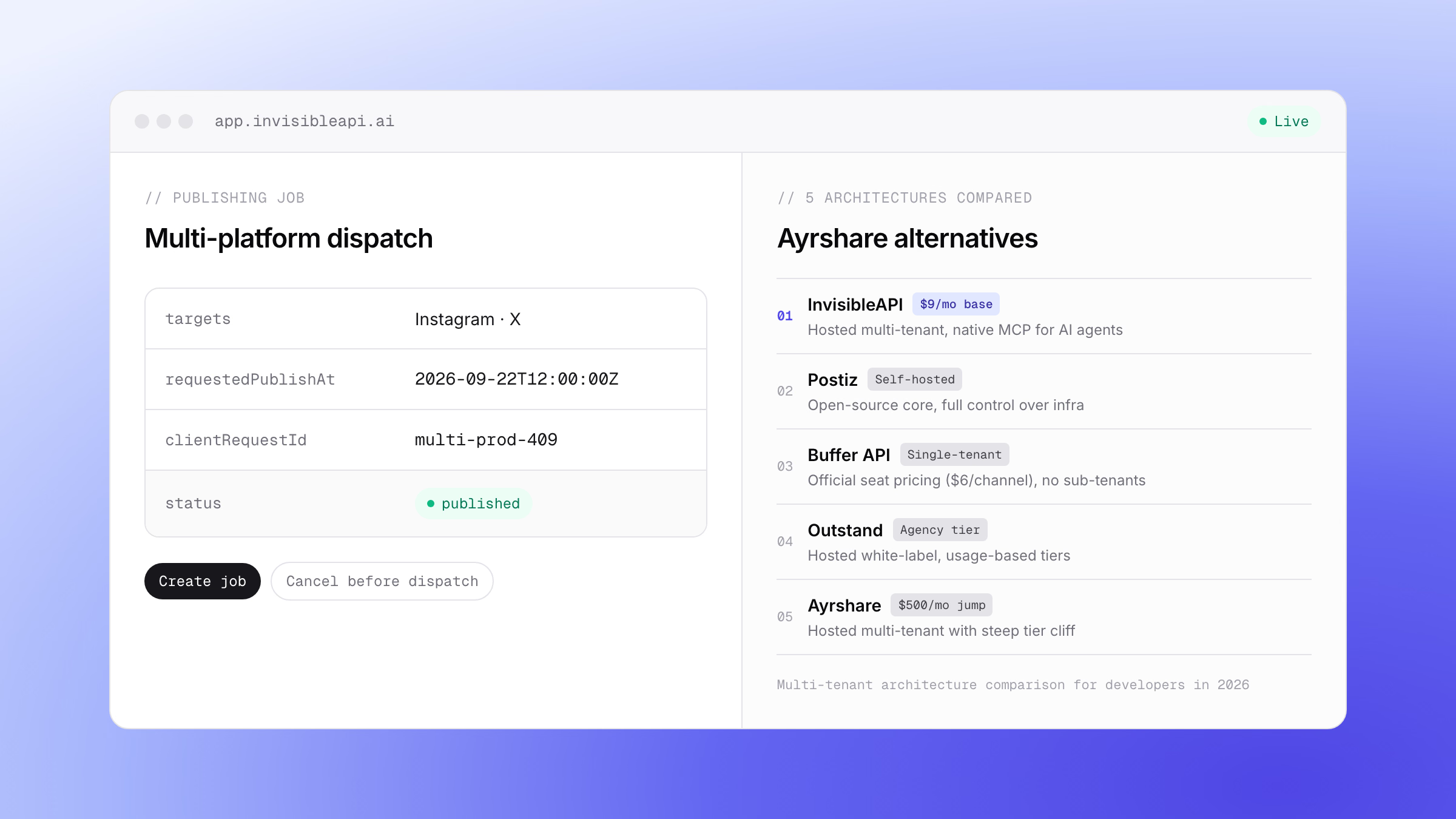
One API instead of the Graph API plumbing. InvisibleAPI is one job-based API for Instagram and X. Connect the account, create a publishing job, poll it until it reaches published.
Get API keyWhat the Instagram API is
The Instagram API is Meta’s official interface for software that works with Instagram professional accounts. It is part of Meta’s Graph API, which is why developers also call it the Instagram Graph API. Here is what it covers in 2026:
| Question | Answer |
|---|---|
| Which accounts? | Professional accounts only (Business or Creator). Personal profiles cannot publish through the API |
| What can it publish? | Single images, carousels of up to 10 items, and videos, which publish as Reels |
| What else can it do? | Read account and media insights, and manage comments |
| How do you log in? | Two paths: Instagram Login (no Facebook Page needed) or Facebook Login (needs a linked Facebook Page) |
| How much does it cost? | Meta publishes no usage fee. The cost is the build and review work, covered in our Instagram API pricing guide |
| Is there a posting limit? | 100 API-published posts per account in a rolling 24 hours. A carousel counts as one |
| Current version | Graph API v26.0, released July 29, 2026 |
The rest of this guide covers the publishing side: the setup, the container flow, media rules, and working code.
Meta changes the platform often. Our monthly Instagram updates page tracks each change and whether it reaches the API.
Prerequisites: Account Setup and Token Requirements
Before writing a single line of publishing code, Meta requires three administrative configuration steps. Missing any one of them will trigger permissions errors ((#100) Invalid parameter or (#200) Permission denied) during API calls.
1. The Professional Account Requirement
Personal Instagram profiles cannot publish content via the API. The account must be converted to an Instagram Professional account (either Business or Creator). You can perform this switch inside the Instagram mobile app under Settings > Account Type and Tools, or through Meta Business Suite.
2. Choosing a Login Path (and When You Need a Facebook Page)
Meta offers two ways to reach the same publishing endpoints:
- Instagram API with Instagram Login: the account owner signs in with Instagram directly. No Facebook Page is needed. Publishing uses the
instagram_business_basicandinstagram_business_content_publishpermissions. - Instagram API with Facebook Login: the account owner signs in with Facebook, and the Instagram professional account must be linked to a Facebook Page your app can access.
On the Facebook Login path, link the accounts from your Facebook Page settings under Linked Accounts, then Instagram. If that link is broken or incomplete, the Graph API will not return an Instagram User ID (ig-user-id) for your token. The permissions in the next step are the ones the Facebook Login path uses.
3. Required App Permissions and Access Tokens
Your Meta Developer App requires the following permissions to publish content:
instagram_basic: To read the connected Instagram account ID and basic profile metadata.instagram_content_publish: To create containers and publish posts.pages_show_listandpages_read_engagement: To locate the Facebook Page associated with the Instagram account.
For development, you can generate a short-lived token using the Graph API Explorer. For production systems, exchange that token for a 60-day Long-Lived User Access Token, or implement Facebook Login with OAuth 2.0 to request permissions dynamically.
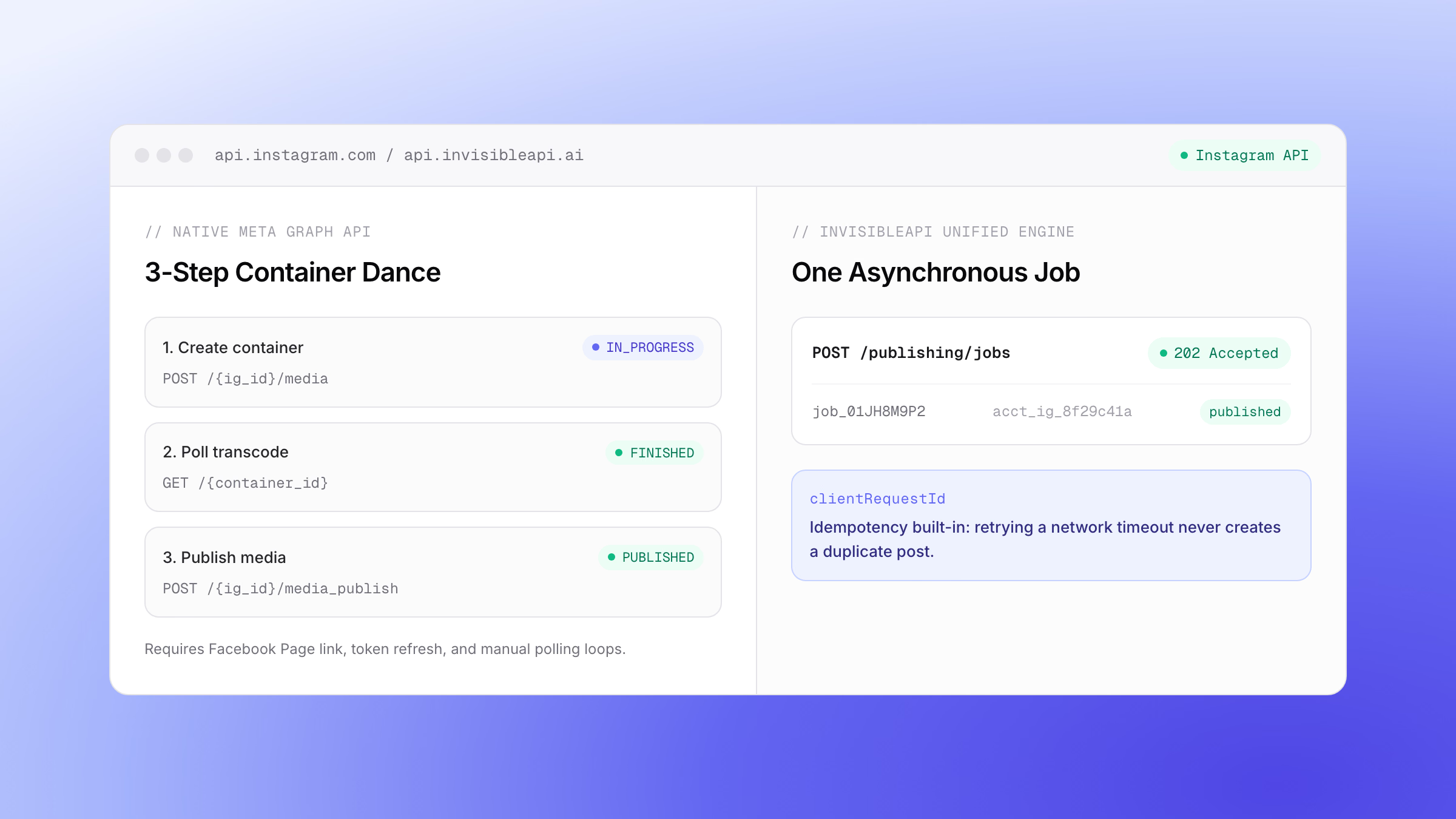
How Meta’s Native API Publishing Works: The 3-Step Container Flow
Meta separates content publishing into three distinct steps because media processing takes time. Rather than holding an HTTP connection open while Instagram downloads, checks, and transcodes a video or high-resolution photo, the API uses a container lifecycle.
| Step | HTTP Method and Endpoint | What It Does |
|---|---|---|
| 1. Create Container | POST /{ig-user-id}/media |
Submits media URL and caption; creates an upload container |
| 2. Poll Status | GET /{container-id}?fields=status_code |
Checks whether Meta has finished downloading and transcoding |
| 3. Publish Container | POST /{ig-user-id}/media_publish |
Publishes the verified container to the live Instagram profile |
Step 1: Create the Media Container
You begin by sending a POST request to the account’s /media endpoint. You provide the image URL, the caption, and your access token.
curl -X POST "https://graph.facebook.com/v21.0/$IG_USER_ID/media" \
  -F "image_url=https://cdn.example.com/images/spring-launch.jpg" \
  -F "caption=Spring collection is live. Shop the link in bio." \
  -F "access_token=$META_ACCESS_TOKEN"
If the payload is valid, Meta returns a container ID:
{
  "id": "17895695634123456"
}
This container is not visible on Instagram yet. It is a temporary holding object on Meta’s servers.
Step 2: Poll Container Status
Before publishing, you must verify that Meta has finished processing the file. Query the container’s status_code field:
curl -X GET "https://graph.facebook.com/v21.0/$CONTAINER_ID?fields=status_code&access_token=$META_ACCESS_TOKEN"Meta returns one of four statuses:
IN_PROGRESS: The media file is still downloading or transcoding. Wait a few seconds and poll again.FINISHED: The container is ready to publish.ERROR: Processing failed (for example, the file was unreachable or corrupted).EXPIRED: The container was not published within 24 hours of creation.
For images, status usually transitions to FINISHED in under two seconds. For videos, transcoding can take 15 to 45 seconds depending on file size and server load.
Step 3: Publish the Container
Once the status reaches FINISHED, trigger the final publish call by passing the container ID as creation_id to the /media_publish endpoint:
curl -X POST "https://graph.facebook.com/v21.0/$IG_USER_ID/media_publish" \
  -F "creation_id=$CONTAINER_ID" \
  -F "access_token=$META_ACCESS_TOKEN"
Meta returns the live Instagram media object ID:
{
  "id": "17923485729987654"
}
The post is now live on the account’s Instagram profile.
Media Constraints: Public URLs, Formats, and Reels
Meta’s Content Publishing API enforces specific technical constraints on the media files you supply.
Public HTTPS URLs Only
Meta does not accept multipart binary file uploads when creating media containers. Your application must upload the image or video to an object store (such as Amazon S3, Cloudflare R2, or a public CDN) and pass that URL to Meta.
The URL must meet three requirements:
- It must be accessible over HTTPS.
- It must not require authentication headers or private cookies.
- The server must return correct
Content-Typeheaders (image/jpegorvideo/mp4).
Image Specifications and Aspect Ratios
- Format: JPEG format is required for feed posts. While PNG works for stories in some contexts, feed publishing mandates JPEG.
- Maximum File Size: 8 MB.
- Aspect Ratio: Must fall between 4:5 (portrait, 0.8 aspect ratio) and 1.91:1 (landscape). If your image is outside this range, the container creation call returns an aspect ratio error.
Videos Publish as Reels
Every single-video upload sent through the Content Publishing API publishes as an Instagram Reel. The standalone video post format was unified with Reels across the platform.
- Format: MP4 or MOV container with H.264 video codec and AAC audio.
- Duration: Between 3 seconds and 15 minutes.
- Maximum File Size: 1 GB.
- Aspect Ratio: 9:16 recommended (1080x1920 pixels), with a maximum frame rate of 60 fps.
Carousels Require Child Containers
Publishing a multi-image or mixed-media carousel adds an extra layer of container nesting:
- Create a child container for each individual image or video by setting
is_carousel_item=true. - Poll each child container until all of them report
FINISHED. - Create a parent container with
media_type=CAROUSELand pass an array of child container IDs in thechildrenparameter. - Publish the parent container to
/media_publish.
Carousels support between 2 and 10 items and can mix images and videos in the same post.
The Single-Job Route: Publishing With InvisibleAPI
Building and maintaining the native container dance across multiple accounts introduces significant maintenance overhead: token storage, token refresh routines, Facebook Page mapping, child container orchestration, and polling loops.
InvisibleAPI provides a unified social publishing engine. Instead of orchestrating multi-step container flows per platform, you send a single asynchronous publishing job.
POST /api/v1/organizations/{organization}/publishing/jobs -> 202 AcceptedThe platform validates the payload preflight, creates the necessary containers, monitors the encoding progress, and handles retryable transient errors automatically.
The Job Lifecycle
When you submit a publishing request, InvisibleAPI returns an asynchronous job object immediately:
{
  "id": "job_01JH8M5V9W2Q4K7X1P0R",
  "status": "processing",
  "clientRequestId": "blog-announcement-2026-09-21",
  "targets": ["acct_ig_8f29c41a"]
}
The job moves through documented states: pending, processing, submitted, and polling, until it reaches a terminal status:
published: Successfully published to Instagram.failed: Permanent failure (for example, invalid image dimensions).action_required: Account credentials expired or disconnected.partial_failure: The job targeted several accounts and some of them failed.canceled: The job was canceled before it published.
About the API samples. targets, mediaItems, caption, clientRequestId, and the job status values are documented platform fields. The exact response envelopes and authentication headers in these examples illustrate the integration flow. Consult the Quick Start Guide for complete schema details.
Code Examples: Images, Reels, and Carousels
Here is how to publish different media types using clean, zero-dependency TypeScript.
Example 1: Publishing a Single Image (cURL and TypeScript)
First, the raw cURL request to dispatch a single image post:
curl -X POST "https://api.invisibleapi.ai/api/v1/organizations/$ORG_ID/publishing/jobs" \
  -H "Authorization: Bearer $INVISIBLE_API_KEY" \
  -H "Content-Type: application/json" \
  -d '{
    "targets": ["acct_ig_8f29c41a"],
    "caption": "Exploring the coast. Photo taken at sunset.",
    "mediaItems": [
      {
        "mediaType": "image",
        "sourceUrl": "https://cdn.example.com/photos/coast-sunset.jpg"
      }
    ],
    "clientRequestId": "sunset-post-001"
  }'
In TypeScript, you can wrap job dispatch and status polling into a clean helper:
interface PublishResult {
  jobId: string;
  status: string;
}

export async function publishInstagramImage(
  orgId: string,
  targetAccountId: string,
  imageUrl: string,
  caption: string,
  clientRequestId: string
): Promise<PublishResult> {
  const apiKey = process.env.INVISIBLE_API_KEY;

  // 1. Submit the asynchronous publishing job
  const response = await fetch(
    `https://api.invisibleapi.ai/api/v1/organizations/${orgId}/publishing/jobs`,
    {
      method: "POST",
      headers: {
        "Authorization": `Bearer ${apiKey}`,
        "Content-Type": "application/json",
      },
      body: JSON.stringify({
        targets: [targetAccountId],
        caption,
        mediaItems: [{ mediaType: "image", sourceUrl: imageUrl }],
        clientRequestId,
      }),
    }
  );

  if (!response.ok) {
    throw new Error(`Job creation failed: ${response.statusText}`);
  }

  const job = await response.json();
  return { jobId: job.id, status: job.status };
}
Example 2: Publishing a Video Reel
Publishing a Reel requires only changing the mediaType to video and providing an MP4 URL. Because video transcoding takes longer, your polling loop checks the job status until it resolves to published:
export async function publishInstagramReel(
  orgId: string,
  targetAccountId: string,
  videoUrl: string,
  caption: string,
  clientRequestId: string
) {
  const apiKey = process.env.INVISIBLE_API_KEY;

  const res = await fetch(
    `https://api.invisibleapi.ai/api/v1/organizations/${orgId}/publishing/jobs`,
    {
      method: "POST",
      headers: {
        "Authorization": `Bearer ${apiKey}`,
        "Content-Type": "application/json",
      },
      body: JSON.stringify({
        targets: [targetAccountId],
        caption,
        mediaItems: [{ mediaType: "video", sourceUrl: videoUrl }],
        clientRequestId,
      }),
    }
  );

  if (!res.ok) {
    throw new Error(`Job creation failed: ${res.status} ${await res.text()}`);
  }

  const job = await res.json();
  return pollUntilComplete(orgId, job.id);
}

const TERMINAL_STATUSES = new Set([
  "published",
  "partial_failure",
  "failed",
  "action_required",
  "canceled",
]);

async function pollUntilComplete(orgId: string, jobId: string, maxAttempts = 20) {
  const apiKey = process.env.INVISIBLE_API_KEY;

  for (let i = 0; i < maxAttempts; i++) {
    await new Promise((resolve) => setTimeout(resolve, 3000));

    const pollRes = await fetch(
      `https://api.invisibleapi.ai/api/v1/organizations/${orgId}/publishing/jobs/${jobId}`,
      { headers: { "Authorization": `Bearer ${apiKey}` } }
    );
    if (!pollRes.ok) {
      throw new Error(`Job lookup failed: ${pollRes.status}`);
    }
    const data = await pollRes.json();

    if (TERMINAL_STATUSES.has(data.status)) {
      return data;
    }
  }

  throw new Error("Job polling timed out before reaching a terminal state.");
}
Example 3: Publishing a Carousel Post
To publish a carousel, pass multiple objects inside mediaItems. You can combine images and videos in the same request:
export async function publishInstagramCarousel(
  orgId: string,
  targetAccountId: string,
  items: Array<{ type: "image" | "video"; url: string }>,
  caption: string,
  clientRequestId: string
) {
  const apiKey = process.env.INVISIBLE_API_KEY;

  const response = await fetch(
    `https://api.invisibleapi.ai/api/v1/organizations/${orgId}/publishing/jobs`,
    {
      method: "POST",
      headers: {
        "Authorization": `Bearer ${apiKey}`,
        "Content-Type": "application/json",
      },
      body: JSON.stringify({
        targets: [targetAccountId],
        caption,
        mediaItems: items.map((item) => ({
          mediaType: item.type,
          sourceUrl: item.url,
        })),
        clientRequestId,
      }),
    }
  );

  return response.json();
}
Under the hood, the API automatically generates individual child containers for each item, waits for all items to complete transcoding, constructs the parent carousel container, and executes the final publish.
Production Reliability: Idempotency, Rate Limits, and Failures
Shipping social publishing to production requires guarding against network interruptions and quota exhaustion.
Preventing Duplicate Posts With clientRequestId
Network connections drop. If a request times out while waiting for a server response, a naive client will retry the call. Without an idempotency guarantee, that retry creates a duplicate post on the user’s feed.
InvisibleAPI accepts an optional clientRequestId (up to 128 characters). If your application sends a request with a clientRequestId that matches a previously received job, the server returns the existing job record rather than dispatching a duplicate:
# Safe retry with identical clientRequestId
curl -X POST "https://api.invisibleapi.ai/api/v1/organizations/$ORG_ID/publishing/jobs" \
  -H "Authorization: Bearer $INVISIBLE_API_KEY" \
  -H "Content-Type: application/json" \
  -d '{
    "targets": ["acct_ig_8f29c41a"],
    "caption": "Product launch details.",
    "mediaItems": [{"mediaType": "image", "sourceUrl": "https://cdn.example.com/p1.jpg"}],
    "clientRequestId": "product-launch-v1"
  }'
If the payload differs for an existing key, the API returns a 409 publishing.idempotency_mismatch error, alerting you to a payload discrepancy.
Platform Rate Limits and Quotas
Meta enforces a strict rate limit on publishing: 100 API-published posts within a 24-hour moving window per Instagram account.
- A single image or Reel counts as one post.
- A carousel containing 10 items also counts as one post toward this quota.
- Third-party articles often cite an outdated limit of 25 posts per day. Meta updated this limit to 100 posts per 24 hours.
If your application exceeds this threshold, Meta returns code 9 with subcode 2207042, and its guidance is to retry the following day. Track your dispatch volume locally to schedule posts across multiple days if you manage high-frequency publishing workflows.
Failure Classification: Caller Errors vs Platform Outages
When a post fails, knowing who owns the fix determines how your system should react:
- Caller Errors (
invalid_publish_data): Caused by invalid aspect ratios, captions exceeding 2,200 characters, or unreachable media URLs. Retrying without changing the payload will fail indefinitely. - Transient Platform Errors (
retryable_provider_failure): Meta’s encoding pipeline experienced a temporary timeout. The publishing job retries automatically. - Credential Issues (
provider_action_required): The user changed their Instagram password, revoked app permissions, or the 60-day token expired. These require re-authenticating the account.
If you build retries yourself, our guide to Instagram API error codes sorts every documented code into retry, fix, escalate or stop. To run publishing on a schedule from your own code, see how to automate Instagram posts with a queue and a failure policy.
For more details on platform thresholds, review how Instagram account limits and constraints work, or see how a social media publishing limits guardrail manages backoff.
Next Steps for Your Build
Publishing to Instagram programmatically comes down to managing the media container lifecycle. If you are building a custom integration for a single account, Meta’s Graph API endpoints provide full direct control over the three container stages.
If you are building an application, internal tool, or AI agent that publishes across multiple accounts, managing tokens, child containers, and error classification in your own codebase quickly becomes cumbersome, which is the work the Instagram posting API takes off your plate. Next, read our guide on how to connect an Instagram account, copy our social media publishing calendar template.
Post to X and Instagram from one API.
Connect the accounts once, create a publishing job, and poll it until it is published. Preflight validation catches a broken post before it reaches the platform, and a clientRequestId makes retries safe.
Sources
- Meta for Developers: Instagram Content Publishing API Documentation (Graph API v21.0, verified September 2026).
- Meta for Developers: Instagram Media Container Reference and Status Codes.
- Meta Platform Terms: Automated Publishing Policies and Token Security Standards.
- InvisibleAPI Reference: Publishing Jobs API Documentation.